
JFCMS/首页模板
来自站长百科
首页模板
a . 使用方法:
制作模板(一般常用的编辑网页软件dreamweaver),把制作的模板,放到控制面板--首页管理中即可,物理路径使用建议的路径,这里要使用网址访问站点首页还要注意一下就是在IIS默认文档里把,要显示的文件添加进去(比如index.shtml).
b . 效果:
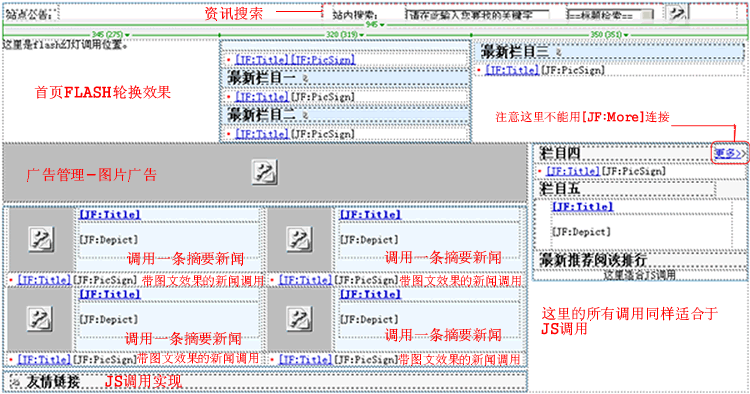

c . 具体代码:
<!DOCTYPE html PUBLIC "-//W3C//DTD XHTML 1.0 Transitional//EN" "http://www.w3.org/TR/xhtml1/DTD/xhtml1-transitional.dtd">
<html xmlns="http://www.w3.org/1999/xhtml">
<head>
<meta http-equiv="Content-Type" content="text/html; charset=gb2312" />
<meta name="keywords" content="asp.net,asp.html,javascript,xml,css,mysql, ms sql,access,oracle" />
<meta http-equiv="description"
name="content-type"
content="asp.net,asp.html,javascript,xml,css,mysql, ms sql,access,oracle,程序开发,
[[数据库]],电脑网络,[[网站]]建设,模板点评,生活点滴,企业人生,生活琐事,情感天地,IT"  />
<title>渐飞IT人阵地-----欢迎你的到来(程序开发、数据库知识、电脑网络、网络互连、网站建设、生活点滴、服务论坛 等)</title>
<link href="http://www.jfstudio.net/css/css.css" rel="stylesheet" type="text/css" />
 <style type="text/css">
<!--
.STYLE1 {color: #FF0000}
.STYLE5 {font-size: 14px}
.STYLE7 {color: #000000}
-->
 </style>
</head>
<body>
<center>
<!--这里是应用于包含文件的头部-->
<!--#include virtual="http://www.jfstudio.net/top.shtml"-->
<br />
<table width="945" cellspacing="0" cellpadding="0" style="border: 1px solid #6caed4;">
  <tr>
    <td width="70" height="25"><div style="margin-left:5px; text-align:left">站点公告:</div></td>
    <td width="334"><!--这里的可以用[[JS]]调用设置-->
   </td>
    <td width="539" height="25">
 <form method="post" action="/search.aspx" target="_blank">
 <table width="95%" border="0" align="center" cellpadding="0" cellspacing="0">
      <tr>
        <td width="18%">站内搜索:</td>
        <td width="40%"><input name='keyword' class="Input" value="请在此输入您要找的关键字"
size="26" maxlength=128 onclick="javascript:this.value=' '"></td>
        <td width="24%"><select name='searchArea' class="Input">
<option value="false">==标题检索==</option>
<option value="true">==标题内容==</option>
</select></td>
        <td width="18%">
  <input type="image" src="/http://www.jfstudio.net/images/search_nmbut.jpg" name="Submit4" value='开始检索'/>
</td>
      </tr>
    </table>
  </form>
 </td>
  </tr>
</table>
<br />
<table width="945" border="0" cellspacing="0" cellpadding="0">
  <tr>
    <td width="345" valign="top" align="left"><table width="98%" border="0" cellspacing="0"
cellpadding="0" style="border: 1px solid #6caed4;">
  <tr>
    <td align="center" valign="top"><script language="javascript" src="http://www.jfstudio.net/js/adv_flash.html"></script></td>
  </tr>
  <tr>
    <td align="center" height="30"><table width="330" border="0" cellspacing="0"
cellpadding="0" style="border: 2px solid  #EAEAEA">
      <tr>
        <td height="20" align="center"><script type="text/javascript"><!--
google_ad_client = "pub-5571671063971311";
google_ad_output = "textlink";
google_ad_format = "ref_text";
google_cpa_choice = "CAAQhaq1_wEaCAInDozL339PKJ2R4YcB";
google_ad_channel = "";
//--></script>
<script type="text/javascript" src="http://pagead2.googlesyndication.com/pagead/show_ads.js">
</script></td>
      </tr>
    </table></td>
  </tr>
</table></td>
    <td width="320" valign="top" align="center"><img src="http://www.jfstudio.net/images/44771.gif" width="313" height="60" />
      <table width="189%" border="0" cellspacing="0" cellpadding="0"style="border: 1px solid #6caed4;">
      <tr>
        <td width="79%" height=""></td>
        </tr>
        <td width="21%" colspan="2" align="center"><table width="98%" border="0" cellspacing="0" cellpadding="0">
          <tr>
            <td bgcolor="#F1F8FE" align="left"><table width="308" height="65" border="0" align="center"
cellpadding="0" cellspacing="0">
   <!--这里的循环条件根据自己的实际来设置-->
              [JF:loop JF:CategoryID=36,JF:NewsType=Depict,JF:NewsCount=1,JF:DepictNum=65,JF:AddDepictStr=...,[JF:TitleNum=15]
  <tr><td width="285" height="19" align="center">
  <a href="[JF:NewsPath]" Title="[JF:sTitle]" target="_blank" class="STYLE5"><strong>[JF:Title] </strong></a></td>
  </tr>
  <tr><td>[JF:Depict]<br>
  </span></td>
[/JF:loop]
  </table></td>
      </tr>
          <tr>
            <td align="left" valign="top"><table width="315">
   <!--这里的循环条件根据自己的实际来设置-->
              [JF:loop JF:CategoryID=39,JF:NewsType=UdlNews,JF:NewsCount=10,JF:TitleNum=15,JF:AddStr=...]
              <tr>
                <td ><span class="STYLE1">·</span><a href="[JF:NewsPath]"
target="_blank" title="[JF:sTitle]"><span class="STYLE5">[JF:Title][JF:PicSign]</span></a></td>
            </tr>
              [/JF:loop]
              </table></td>
      </tr>
          <tr>
            <td width="83%" bgcolor="#DDEDFC" height="25"><div style="margin-left:10px; text-align:left">
              <h3>最新栏目一 <img src="http://www.jfstudio.net/images/jt.gif" width="6" height="11" /></h3>
          </div></td>
      </tr>
          <tr>
            <td align="left" valign="top"><table width="315">
   <!--这里的循环条件根据自己的实际来设置-->
              [JF:loop JF:CategoryID=17,JF:NewsType=UdlNews,JF:NewsCount=10,JF:TitleNum=18,JF:AddStr=...]
              <tr>
                <td><span class="STYLE1">·</span><a href="[JF:NewsPath]" title="[JF:sTitle]"
target="_blank" class="STYLE5">[JF:Title]</a>[JF:PicSign]</td>
            </tr>
              [/JF:loop]
              </table></td>
      </tr>
          <tr>
            <td>
    <!-- 这里同样使用于广告管理中的广告调用--></td>
    </tr>
          <tr>
            <td bgcolor="#DDEDFC" height="25"><div style="margin-left:10px; text-align:left">
              <h3>最新栏目二 <img src="http://www.jfstudio.net/images/jt.gif" width="6" height="11" /></h3>
      </div></td>
      </tr>
          <tr>
            <td align="left" valign="top"><table width="315">
   <!--这里的循环条件根据自己的实际来设置-->
              [JF:loop JF:CategoryID=13,JF:NewsType=UdlNews,JF:NewsCount=11,JF:TitleNum=18,JF:AddStr=...]
              <tr>
                <td><span class="STYLE1">·</span><a href="[JF:NewsPath]" title="[JF:sTitle]"
target="_blank" class="STYLE5">[JF:Title]</a>[JF:PicSign]</td>
            </tr>
              [/JF:loop]
              </table></td>
      </tr>
          </table></td>
    </tr>
      </table></td><td width="350" valign="top" align="left"><table width="349">
        <tr>
            <td width="98%" bgcolor="#DDEDFC" height="25"><div style="margin-left:10px; text-align:left">
              <h3>最新栏目三 <img src="http://www.jfstudio.net/images/jt.gif" width="6" height="11" /></h3>
          </div></td>
      </tr>
    <tr>
                <td><span class="STYLE1">·</span><a href="[JF:NewsPath]" title="[JF:sTitle]"
target="_blank" class="STYLE5">[JF:Title]</a>[JF:PicSign]</td>
          </tr>
   </table>
   </td>
  </tr>
</table>
<table width="945" border="0" cellspacing="0" cellpadding="0">
  <tr>
    <td width="665" valign="top" align="left"><table width="100%" border="0" cellspacing="0" cellpadding="0">
      <tr>
        <td align="center">
  <!-- 这里同样使用于广告管理中的广告调用-->
  <IFRAME marginHeight=0 marginWidth=0 noResize scrolling=no frameBorder=0
src='http://www.jfstudio.net//showad.aspx?AdsCategoryID=1' width=665 height=75></IFRAME></td>
      </tr>
    </table>
      <table width="100%" border="0" cellspacing="0" cellpadding="0">
        <tr>
          <td height="5"></td>
        </tr>
      </table>
      <table width="100%" border="0" cellspacing="0" cellpadding="0" style="border: 1px solid #6caed4;">
        <tr>
          <td width="50%" align="center"><table width="98%" border="0" cellspacing="0" cellpadding="0">
            <tr>
              <td width="27%" align="center"><img src="http://www.jfstudio.net/images/cxsj.jpg"
width="82" height="83" /></td>
     <td width="73%" align="left" valign="top" bgcolor="#EFF9FC"><table width="230"
height="65" border="0" align="center" cellpadding="0" cellspacing="0"><br />
<!--这里的循环条件根据自己的实际来设置-->
[JF:loop JF:CategoryID=27,JF:NewsType=Depict,JF:NewsCount=1,JF:DepictNum=50,JF:TitleNum=15]
<tr><td width="229" height="19">
<a href="[JF:NewsPath]" Title="[JF:sTitle]" target="_blank"><strong>[JF:Title]</strong></a></td>
</tr>
<tr><td><span class="STYLE7">[JF:Depict]</span><br>
</span></td>
[/JF:loop]
</table></td>
            </tr>

          </table></td>
          <td width="50%"><table width="99%" border="0" cellspacing="0" cellpadding="0">
            <tr>
              <td width="27%" align="center"><img src="http://www.jfstudio.net/images/dnwl.jpg"
width="82" height="83" /></td>
     <td width="73%" align="left" valign="top" bgcolor="#EFF9FC"><table width="230"
height="65" border="0" align="center" cellpadding="0" cellspacing="0">
     <!--这里的循环条件根据自己的实际来设置-->
[JF:loop JF:CategoryID=34,JF:NewsType=Depict,JF:NewsCount=1,JF:DepictNum=50,JF:TitleNum=15]
<tr><td width="229" height="19">
<a href="[JF:NewsPath]" Title="[JF:sTitle]" target="_blank"><strong>[JF:Title] </strong></a></td>
</tr>
<tr><td><span class="STYLE7">[JF:Depict]</span><br>
</span></td>
[/JF:loop]
</table></td>
            </tr>

          </table></td>
        </tr>
        <tr>
          <td><table width="98%" border="0" align="center" cellpadding="0" cellspacing="0">
    <!--这里的循环条件根据自己的实际来设置-->
[JF:loop JF:NewsCount=8,JF:CategoryID=27,JF:TitleNum=20,JF:Sort=DateTime]
<tr>

<td height="18" valign="middle"><span class="STYLE1">·</span><a href="[JF:NewsPath]" Title="[JF:sTitle]"
target="_blank" class="STYLE5">[JF:Title]</a>[JF:PicSign]</td>
</tr>
[/JF:loop]
</table></td>
          <td><table width="98%" border="0" align="center" cellpadding="0" cellspacing="0">
    <!--这里的循环条件根据自己的实际来设置-->
[JF:loop JF:NewsCount=8,JF:CategoryID=25,JF:TitleNum=20,JF:Sort=DateTime]
<tr>
<td height="18" valign="middle"><span class="STYLE1">·</span><a href="[JF:NewsPath]" Title="[JF:sTitle]"
target="_blank" class="STYLE5">[JF:Title]</a>[JF:PicSign]</td>
</tr>
[/JF:loop]
</table></td>
        </tr>
        <tr>
          <td><table width="99%" border="0" cellspacing="0" cellpadding="0">
            <tr>
              <td width="28%" align="center"><img src="http://www.jfstudio.net/images/wzjs.jpg" width="82" height="83" /></td>
     <td width="72%" align="left" valign="top" bgcolor="#EFF9FC"><table width="230"
height="65" border="0" align="center" cellpadding="0" cellspacing="0">
     <!--这里的循环条件根据自己的实际来设置-->
[JF:loop JF:CategoryID=28,JF:NewsType=Depict,JF:NewsCount=1,JF:DepictNum=50,JF:TitleNum=15]
<tr><td width="229" height="19">
<a href="[JF:NewsPath]" Title="[JF:sTitle]" target="_blank"><strong>[JF:Title] </strong></a></td>

</tr>
<tr><td><span class="STYLE7">[JF:Depict]</span><br>
</span></td>
[/JF:loop]
</table></td>
            </tr>

          </table></td>
          <td><table width="99%" border="0" cellspacing="0" cellpadding="0">
            <tr>
              <td width="27%" align="center"><img src="http://www.jfstudio.net/images/sjgl.jpg" width="82" height="83" /></td>
     <td width="73%" align="left" valign="top" bgcolor="#EFF9FC"><table width="230"
height="65" border="0" align="center" cellpadding="0" cellspacing="0">
     <!--这里的循环条件根据自己的实际来设置-->
[JF:loop JF:CategoryID=20,JF:NewsType=Depict,JF:NewsCount=1,JF:DepictNum=50,JF:TitleNum=15]
<tr><td width="229" height="19">
<a href="[JF:NewsPath]" Title="[JF:sTitle]" target="_blank"><strong>[JF:Title] </strong></a></td>
</tr>
<tr><td><span class="STYLE7">[JF:Depict]</span><br>
</span></td>
[/JF:loop]
</table></td>
            </tr>

          </table></td>
        </tr>
        <tr>
          <td><table width="98%" border="0" align="center" cellpadding="0" cellspacing="0">
    <!--这里的循环条件根据自己的实际来设置-->
[JF:loop JF:NewsCount=8,JF:CategoryID=31,JF:TitleNum=20,JF:Sort=DateTime]
<tr>
<td height="18" valign="middle"><span class="STYLE1">·</span><a href="[JF:NewsPath]"
Title="[JF:sTitle]" target="_blank" class="STYLE5">[JF:Title]</a>[JF:PicSign]</td>
</tr>
[/JF:loop]
</table></td>
          <td><table width="98%" border="0" align="center" cellpadding="0" cellspacing="0">
    <!--这里的循环条件根据自己的实际来设置-->
[JF:loop JF:NewsCount=8,JF:CategoryID=20,JF:TitleNum=20,JF:Sort=DateTime]
<tr>
<td height="18" valign="middle"><span class="STYLE1">·</span><a href="[JF:NewsPath]"
Title="[JF:sTitle]" target="_blank" class="STYLE5">[JF:Title]</a>[JF:PicSign]</td>
</tr>
[/JF:loop]
</table></td>
        </tr>
      </table>
   <table width="100%" border="0" cellspacing="0" cellpadding="0">
        <tr>
          <td height="5"></td>
        </tr>
      </table>
   <table width="100%" border="0" cellspacing="0" cellpadding="0" style="border: 1px solid #6caed4;">
      <tr>
        <td bgcolor="#F6F6F6" height="25"><div style="margin-left:10px; text-align:left">
          <h3><img src="http://www.jfstudio.net/images/blt_sub_oneline01.gif" width="11" height="11" />
友情链接   </h3>
        </div></td>
      </tr>
   <tr>
   <!--这里全是用JS调用-->
        <td align="center"><script src='http://www.jfstudio.net/js/PFile_20071301162058.js'></script></td>
      </tr>
   <tr>
        <td align="center"><script src='http://www.jfstudio.net/js/PFile_20071301162124.js'></script></td>
      </tr>
    </table>
    </td>
    <td width="280" valign="top" align="right"><table width="98%" border="0" cellspacing="0"
cellpadding="0"style="border: 1px solid #6caed4;">
      <tr>
        <td width="85%" bgcolor="#F6F6F6" height="25"><div style="margin-left:10px; text-align:left">
          <h3>栏目四</h3>
        </div></td>
        <td width="15%" bgcolor="#F6F6F6"><a href="setup/">更多></a>></td>
      </tr>
      <tr>
        <td colspan="2"><table width="98%" border="0" align="center" cellpadding="0" cellspacing="0">
  <!--这里的循环条件根据自己的实际来设置-->
[JF:loop JF:NewsCount=14,JF:CategoryID=36,JF:TitleNum=20,JF:Sort=DateTime]
<tr>
<td height="20" align="left"><span class="STYLE1">·</span><a href="[JF:NewsPath]" target="_blank"
Title="[JF:sTitle]">[JF:Title]</a>[JF:PicSign]</td>
</tr>
[/JF:loop]
</table></td>
      </tr>
   <tr>
        <td width="85%" bgcolor="#F6F6F6" height="25"><div style="margin-left:10px; text-align:left">
          <h3>栏目五</h3>
        </div></td>
        <td width="15%" bgcolor="#F6F6F6"> </td>
      </tr>
      <tr>
        <td colspan="2"><table width="100%" border="0" cellspacing="0" cellpadding="0">
          <tr>
            <td align="center" valign="middle"><div style="margin-left:3px; text-align:left"><table width="230"
height="65" border="0" align="center" cellpadding="0" cellspacing="0">
   <!--这里的循环条件根据自己的实际来设置-->
[JF:loop JF:CategoryID=27,JF:NewsType=Depict,JF:NewsCount=1,JF:DepictNum=50,JF:TitleNum=15]
<tr><td width="229" height="19">
<a href="[JF:NewsPath]" Title="[JF:sTitle]" target="_blank"><strong>[JF:Title]</strong></a></td>
</tr>
<tr><td><span class="STYLE7">[JF:Depict]</span><br>
</span></td>
[/JF:loop]
</table>
                </div></td>
            </tr>
      <tr>
        <td bgcolor="#F6F6F6" height="25"><div style="margin-left:10px; text-align:left">
          <h3>专题报道</h3>
        </div></td>
      </tr>
    <tr>
        <td align="center">这里适合JS调用<!---同样的在首页也可以直接写JF标签进行调用--></td>
      </tr>
        </table>  </td>
      </tr>

    </table></td>
  </tr>
</table>
<!--这里用的是包含文件的底部-->
<!--#include virtual="http://www.jfstudio.net/down.shtml"-->
</center>
</body>
</html>
参考来源[ ]
JFCMS使用手册导航 | ||||||||
|---|---|---|---|---|---|---|---|---|
|